Search Filters

6152 results compatible with Maya
-
![ZenTools 1.7.1 for Maya (maya script)]() ZenTools for Maya
ZenTools for Maya
Polygon modeling tools for manipulating a mesh using dynamically created NURBS curves and surfaces to distribute vertices and/or UVs, plus some selection tools to complement the workflow.
Works in:
-
![Maya Dragon Rig 3D Model]()
-
![RigBox 4.0.3 for Maya (maya script)]() RigBox for Maya
RigBox for Maya
This tool is a rig helper. It’s used in Maya to help with control objects and icon creation, and other basic rig construction tasks.
Works in:
-
![Cyclops Animated 3D Model]() Cyclops Animated 3D Model
Cyclops Animated 3D Model
Cyclops Is High Quality 3D Character Model That is Rigged And Animated With 9 Animations.
Works in:

-
![Fang Tooth Animated 3D Model]() Fang Tooth Animated 3D Model
Fang Tooth Animated 3D Model
Fang Tooth Is A 3D Animal Model That Is Rigged And Animated With 3 Animations.
Works in:
-
![QuickCollider 1.1.2 for Maya (maya script)]() QuickCollider for Maya
QuickCollider for Maya
Toolbox for creating simple colliders from selection, to speed up workflow
Works in:
-
![OneLiner Simple Renamer Tool 1.2.0 for Maya (maya script)]() OneLiner Simple Renamer Tool for Maya
OneLiner Simple Renamer Tool for Maya
One line outliner renamer tool. One line is all you need!
Works in:
-
![Nina, Android 18, Android 21, Caulifla and Kefla 3D Model]() Nina, Android 18, Android 21, Caulifla and Kefla 3D Model
Nina, Android 18, Android 21, Caulifla and Kefla 3D Model
Nina Is A High Quality 3D Character Model That Is Rigged, Textured and Animated With 17 Animations.
Works in:
-
![Dixie Animated 3D Model]() Dixie Animated 3D Model
Dixie Animated 3D Model
Dixie Is A High Quality 3D Character Model That Is Rigged, Textured and Animated With 14 Animations.
Works in:
-
![Chanel 3D Character Animated 3D Model]() Chanel 3D Character Animated 3D Model
Chanel 3D Character Animated 3D Model
Chanel Is A High Quality 3D Character Model That Is Rigged, Textured And Animated With 13 Animations.
Works in:

-
![Coplanar Joint Orient 0.9.0 for Maya (maya script)]()
-
![Double Side Texture 6.0.0 for Maya (maya script)]()
-
![Gia Animated 3D Model]() Gia Animated 3D Model
Gia Animated 3D Model
Gia Is A High Quality 3D Character That Is Rigged, Textured and Animated With 13 Animations.
Works in:
-
![Tree Monster Animated 3D Model]() Tree Monster Animated 3D Model
Tree Monster Animated 3D Model
Tree Monster Is A 3D Character Model That is Rigged And Animated With 8 Animations
Works in:
-
![Universal IK FK Switch and Match Tool 3.1.0 for Maya (maya script)]() Universal IK FK Switch and Match Tool for Maya
Universal IK FK Switch and Match Tool for Maya
Match poses between IK/FK controls with any Rigg. Define and Store Controls in Node for faster use.
Works in:
-
![Overlappy 0.1.0 for Maya (maya script)]()
-
![ROBOTIC - THE ROBOT RIG 0.0.1 for Maya]()
-
![prSelectionUi 0.9.8 for Maya (maya script)]()
-
![Hulk Buster, Jackson, Ant-Man, Wolverine and Rocket 3D Model]() Hulk Buster, Jackson, Ant-Man, Wolverine and Rocket 3D Model
Hulk Buster, Jackson, Ant-Man, Wolverine and Rocket 3D Model
Jackson Is A High Quality 3D Character Model That Is Rigged, Textured and Animated With 13 Animations.
Works in:
-
![MIDI Tools Plug-in for Maya 1.0.1 for Maya (maya script)]()
-
![AdvancedSkeleton6 0.6.5 for Maya (maya script)]() AdvancedSkeleton6 for Maya
AdvancedSkeleton6 for Maya
AdvancedSkeleton is a collection of Maya tools for doing character setup
Works in:
-
![multi swapper 1.1.3 for Maya (maya script)]() multi swapper for Maya
multi swapper for Maya
Retains the anim keys position in world space and swaps the parenting of that control
Works in:
-
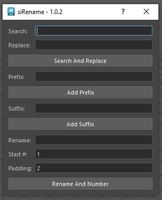
![siRename 1.0.2 for Maya (maya script)]() siRename for Maya
siRename for Maya
For practice, I rewrote in Python and PySide2, the script cometRename.mel by Michael Comet. A nice renaming utility that allows basic Prefix, Suffix, Search & Replace, and Rename & Number methods.
Works in: